
All Video Downloader
InShot Inc.Video Players & Editors
4.711.51K Reviews
- Version
- 1.6.4
- Installs
- 100.00M
- Age Rating
- Everyone
Screenshots
Our Review of All Video Downloader
 Analysis by Appyee
I reach for a video downloader when I want to keep a clip available beyond the moment I find it: perhaps to watch during a commute, revisit a recipe, or show a friend without relying on a connection. All Video Downloader is built around that straightforward job. Made by InShot Inc., it is a free Android app in the video-player and editing category, with a 4.7 average from around 1.1 million ratings and over 100 million installs. That popularity makes it easy to understand why people try it, but the useful question is whether its download-first approach fits the way you actually watch videos.
Saving a clip is the main event
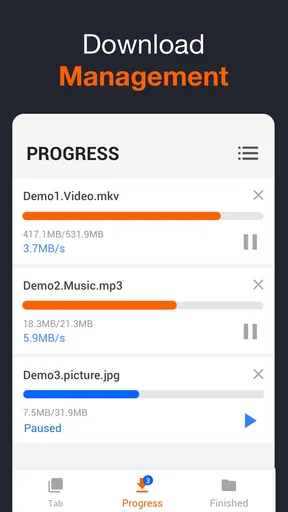
The central appeal is the ability to download videos from social websites for offline viewing. That sounds simple, yet it changes how I use a clip: once a suitable video is saved, I can return to it without hunting through a feed or depending on a reliable connection. It can be handy for a short tutorial, a travel reference, or a clip I want to keep accessible while I am away from Wi-Fi. It is not a replacement for a streaming service or a full editing suite; its value is in making a video easier to keep close at hand.
There is a practical distinction worth keeping in mind: finding a video online does not automatically mean it can or should be saved. A platform may restrict downloads, and a creator’s rights still matter. I use tools like this for material I am allowed to save, rather than treating every public clip as mine to copy. That small bit of judgment matters more than the convenience of any download button.
Getting Started with All Video Downloader
First things first, downloading and setting up All Video Downloader is a breeze. It’s available for both Android and iOS, so no worries about compatibility issues. Once you fire it up, the interface is pretty straightforward. I mean, you won’t need a degree in rocket science to figure this one out. The home screen is clean, with a search bar right at your fingertips. Simply paste the link of the video you’re itching to download, and you’re halfway there.
Features That Stand Out
What really sets this app apart is its versatility. We’re talking about downloading videos from a wide range of platforms. Whether it’s YouTube, Facebook, Instagram, or even some obscure site you stumbled upon, All Video Downloader has got you covered. The download speeds are impressive too. I’ve tested a few apps in my time, and this one holds its ground pretty well.
Another cool feature is the ability to choose the quality of your download. Want that video in HD? No problem! Running low on storage and need a smaller file? The app lets you dial it down a notch. This flexibility is a game-changer, especially if you’re juggling with limited storage space on your device.
Quality choice is more useful when it is tied to a specific purpose than when it is treated as a default “best” setting. For a quick reference clip, I would favor a smaller file and save space for things I watch repeatedly. For a video where small details matter, a higher-quality copy makes more sense, provided I have room. Checking the available space before saving a batch is a simple habit that prevents an offline library from quietly taking over the phone.
Usability and Design
The app’s design is all about simplicity. The developers have clearly focused on making the user experience as seamless as possible. Navigation is intuitive, and the settings are easy to tweak. You won’t find yourself lost in a maze of options, which is a relief in today’s app-crowded world.
One thing that caught my attention is how the app integrates a built-in browser. This means you can browse directly within the app, find the video you want, and download it without switching back and forth between apps. It’s like having your cake and eating it too!
That browser-based flow is particularly useful when I have found a clip in a feed but do not want to juggle several apps just to save it. A careful workflow is to locate the specific video first, confirm it is the one I intended to keep, and then choose an appropriate quality rather than downloading several versions by trial and error. If a page does not make the video easy to identify or the download option does not behave as expected, I would stop and use the platform’s own viewing or saving tools instead of repeatedly retrying.
A realistic reason to keep it installed
Imagine you find a short cooking demonstration while planning dinner, but the kitchen has patchy reception and you will want to replay one step with messy hands. Saving a permitted copy ahead of time can make that moment less frustrating than searching through your social feed again. The same logic works for a workout reference or a visual instruction you need to revisit. The app is most useful when the video has a clear, temporary purpose; it is less compelling as a way to collect everything you scroll past.
I also see a small organizational trade-off in that use. A saved file is only convenient if I can find it later, so I would download selectively and give myself a simple routine: save the few clips I genuinely need, watch them, and clear out anything that no longer serves a purpose. That approach matters especially on a phone used for photos, messaging, and other large files. The download itself is only half the job; keeping the collection manageable is what makes offline access feel helpful rather than cluttered.
Where it fits among other options
Compared with opening a social app each time, a downloader can be a more direct route to offline access when the site and video allow it. Compared with a platform’s own save or offline-viewing option, however, the platform tool may be the better choice if it keeps the clip within its intended service or offers a more dependable route for that particular content. I would not expect a general downloader to work equally well with every site: formats, page layouts, and platform restrictions can all affect the experience.
It is also worth separating downloading from editing. The category may include video editors and players, but this app’s defining task is saving videos, not making a polished cut, adding captions, or organizing a production workflow. If I wanted to trim footage, assemble several clips, or prepare a finished post, I would choose a dedicated editor. If I only wanted to keep an allowed clip available for later, this simpler kind of tool would make more sense.
What to expect from the free option
The app is free to install, and its age rating is Everyone. In-app purchases range from $7.99 to $19.99 per item, while the current version is 1.6.3 and Android support starts at version 6.0. Those details help set expectations, but I would decide whether to spend based on my own use rather than assuming a paid option is necessary. The free version may be enough for occasional downloads; someone who uses it regularly can weigh the available purchase against how much the ads interrupt their routine.
There are a few sensible questions to ask before making it part of a daily workflow. Will a particular site work? I would test the exact kind of page I use, since broad support does not guarantee every video or platform will behave the same way. Can I choose between file sizes? The quality controls described in the app make that a useful decision point. Is it suitable for building a permanent archive? I would be cautious: social content can disappear or change, and keeping a local copy does not replace a proper backup or give permission to redistribute it.
Who gets the most from it
I think the strongest fit is someone who occasionally needs a few social videos offline and values a browser and download flow in one place. It can suit commuters, travelers, students revisiting permitted instructional clips, and anyone who wants a reference video close by when connectivity is unreliable. It is less suitable for a person who expects every site to work perfectly, wants advanced editing controls, or prefers not to manage downloaded files and occasional ads.
For Android users, the app has a 6.0 minimum operating-system requirement. Its free entry point makes it easy to try, though the presence of optional in-app purchases means the experience may not be identical for everyone. I would start with one video I am allowed to save, check that the chosen quality suits my storage, and see whether the browsing and download steps feel comfortable before relying on it for a larger collection.
What’s the Catch?
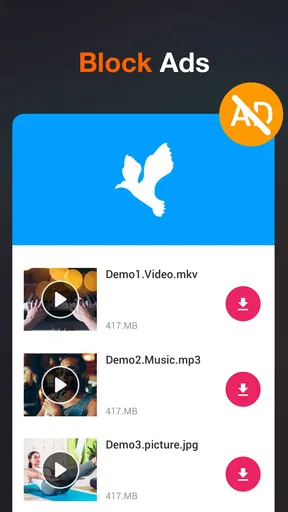
Now, let’s talk about the elephant in the room—ads. Yes, the app is free, and yes, it comes with ads. They’re not overbearing, but they do pop up now and then. If ads drive you up the wall, there’s an option to go ad-free with a premium version. For me, the free version works just fine. The ads are a small price to pay for the convenience this app offers.
Also, while the app supports most popular sites, there are a few platforms where it struggles a bit. It’s not a deal-breaker, but it’s something to keep in mind if you’re venturing into lesser-known video sites.
That inconsistency is the main reason I would not make it my only route to important material. If a download stalls or a site changes how its pages work, retrying over and over may cost more time than opening the original service. For something I need once, I would switch approaches rather than let a failed download become a project. For a frequently used site that works smoothly, the convenience may outweigh that occasional uncertainty.
Final Thoughts
So, is All Video Downloader worth your time? I’d say it’s a solid yes. It combines ease of use with a robust set of features that make video downloading a breeze. Whether you’re a casual downloader or someone who hoards videos like there’s no tomorrow, this app is a handy tool to have in your arsenal.
In a nutshell, if you’re looking for an app that gets the job done without too much fuss, give All Video Downloader a whirl. Trust me, your video library will thank you.
Verdict
Strengths of All Video Downloader
- Downloads videos from multiple platforms.
- Supports HD and 4K video quality.
- User-friendly interface for easy navigation.
- Fast download speeds with no lag.
- Allows batch downloading of files.
Limitations of All Video Downloader
- Contains ads that can be intrusive.
- Limited support for some video formats.
- Requires additional permissions to function.
- No built-in video player for previews.
- Some downloads may fail without reason.
Other Releases by InShot Inc.
View All
Video Downloader
Video Players & Editors4.7

Music Player & MP3 Player
Music & Audio4.7

Video Player All Format
Video Players & Editors4.8

Photo Editor - Polish
Photography4.8
Similar Picks in This Category
View All
Google TV
Google LLC3.9

iTunes
Apple4.7

YouTube
Google LLC3.8

MX Player
Amazon Mobile LLC4.2

CapCut - Video Editor
Bytedance Pte. Ltd.3.5

PLAYit-All in One Video Player
PLAYIT TECHNOLOGY PTE. LTD.4.5
Frequently Asked Questions
What is All Video Downloader, and how does it work?
All Video Downloader is an application designed to help users download videos from various online platforms. It supports multiple formats and resolutions, allowing you to save content directly to your device for offline viewing. The app features a simple interface where you paste the video URL, choose your preferred settings, and start the download process.
Is All Video Downloader compatible with both Android and iOS devices?
Yes, All Video Downloader is available for both Android and iOS platforms. However, the app's features and functionality might vary slightly between the two operating systems due to platform-specific restrictions. Always check the app store for the latest version and compatibility details before downloading.
Are there any in-app purchases or subscription fees for All Video Downloader?
All Video Downloader offers a free version with basic features. However, it may also offer in-app purchases or a subscription model to unlock advanced features such as higher download speeds, additional format support, and an ad-free experience. Be sure to review the pricing details within the app to make an informed decision.
Is it legal to download videos using All Video Downloader?
The legality of downloading videos depends on the terms and conditions of the source website. All Video Downloader itself is a legal tool, but users must ensure they have the right to download content. Always check the copyright policies of the platform from which you intend to download videos to avoid any legal issues.
How secure is All Video Downloader in terms of privacy and data protection?
All Video Downloader prioritizes user privacy and adheres to standard data protection protocols. However, users should be cautious about the permissions granted to the app and ensure they download it from a reputable source to avoid malware or data breaches. Regularly update the app to ensure you have the latest security patches.
